CLZ Books - library organizer
- 4.7
- Rating
- 100.00K
- Installs
- Free
- Price

 Analysis by App-foxy
Keeping track of a personal library sounds simple until books start arriving from different places: gifts, used-book shops, school shelves, moving boxes, and forgotten corners of the house. I found CLZ Books most useful when I stopped treating it as a reading journal and started using it as a practical inventory. Its central job is to identify books through ISBN barcodes, then give me a more orderly way to see what I own.
That focus makes it different from a general note-taking app or a social reading service. I am not using it primarily to discuss books, write long reviews, or discover what strangers are reading. I am using it to answer everyday questions quickly: Do I already own this edition? Which books are in my collection? What did I buy recently? Can I check my library before ordering another copy?
CLZ Books is a free Books & Reference app from CLZ, available for Everyone, with optional in-app purchases ranging from $0.99 to $19.99 per item. The store summary presents a subscription of US $20 per year, so the free entry point is useful, but regular use may eventually involve a paid choice. I think that distinction matters for anyone building a large collection rather than casually cataloging a few titles.
You May Also Like

 Blood Strike: 2.5 Anniversary
Blood Strike’s Loadouts Turn Every Drop Into a Tactical Gamble
A close look at Blood Strike’s custom loadouts: how fast access to signature weapons reshapes its battle royale rhythm, rewards preparation, and narrows the gap between fights.

 Pandora - Music & Podcasts
Pandora’s Music Is Easy to Start, but Harder to Recover
Pandora’s strength is its low-effort path from a seed to a station. Its weak spot is how much confidence it asks you to place in connection, setup, and quiet recovery.

 8 Ball Pool
8 Ball Pool Is Built on Rivalries, Rematches, and Routine
A close look at the rivalries, rematches, shared routines, and unanswered safety questions that turn a quick pool match into a persistent mobile community.

 Samsung Music
Samsung Music’s Quiet Strength Is Playing What You Already Own
Its reach comes less from spectacle than from dependable access to a personal library. That simplicity is both the app’s strongest retention engine and its ceiling.

 AccuWeather: Weather Radar
AccuWeather Review: A Quick, Clear Forecast for Everyday Decisions
For everyday plans, the best forecast is the one you can understand quickly. AccuWeather makes rain timing, radar, and local conditions easy to act on, with a few trade-offs.

 Hill Climb Racing
Why Hill Climb Racing Still Turns Crashes Into One More Run
A tiny car, a bumpy hill and one more upgrade: Hill Climb Racing keeps resurfacing because its simple chaos makes every near-miss feel personal.
More From Our News Desk



How the library feels to read and navigate
The strongest part of the experience is the shift from typing to scanning. When a book has a readable ISBN barcode, I can use the phone’s camera instead of entering a title, author, publisher, and edition by hand. That is a meaningful improvement for people who find extended typing tiring, slow, or error-prone. It also reduces the chance of creating several slightly different records for the same book.
The barcode-first approach is especially helpful during a large cataloging session. I can work through a shelf in a repeatable rhythm: pick up a book, scan it, check the result, and move on. That workflow is less mentally demanding than deciding how every title should be spelled or formatted. For a household library, the benefit is not just speed; it is consistency.
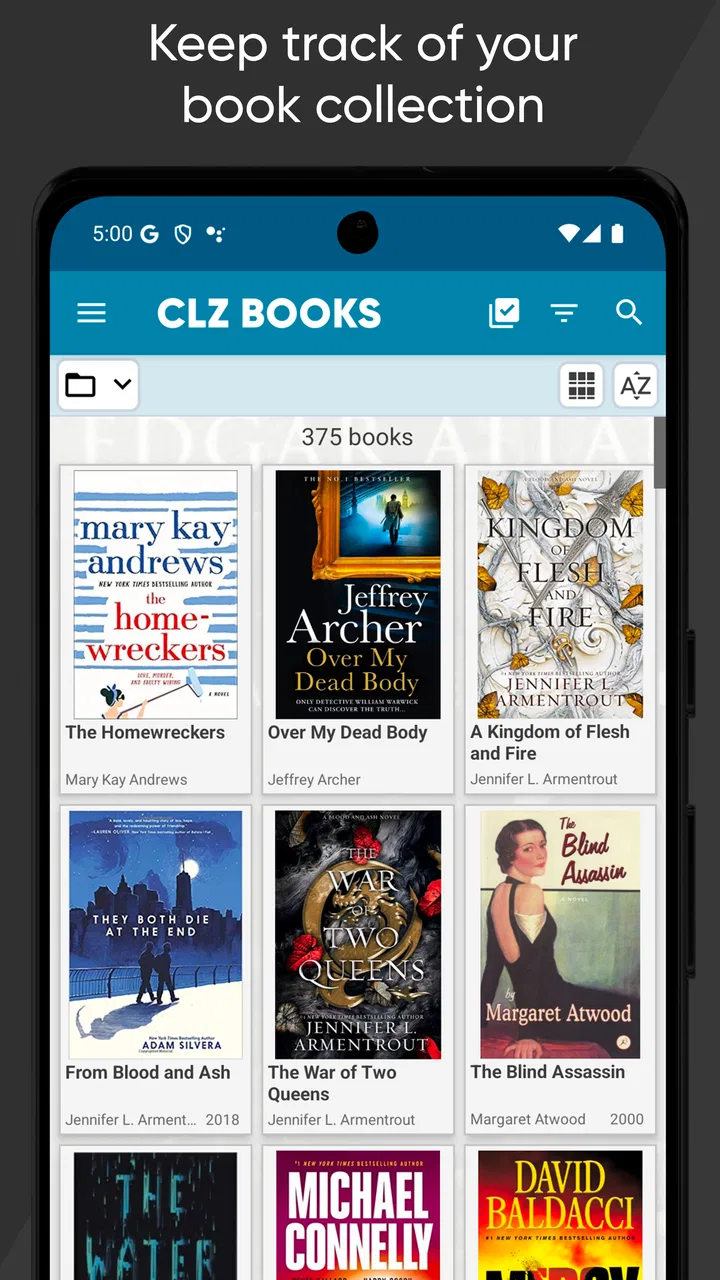
Readability depends on how much information is displayed at once and on the phone being used, but the app’s purpose gives its screens a practical structure. A catalog needs to let me recognize a cover, title, author, and collection status without making me open every record. I found that useful when browsing rather than searching for one exact book. A visual shelf view can support recognition, while text-based searching is better when I know the title or writer.
One habit improved my results: I treated every scan as a suggestion to verify, not as an automatic final answer. Different editions can share a title while having different ISBNs, cover designs, translations, or publication details. Before moving on, I checked the cover and bibliographic information against the physical copy. That extra moment prevents a clean-looking catalog from quietly becoming inaccurate.
This is also where the app can help readers who find dense paper lists difficult to manage. A digital collection can be searched instead of remembered, and visual covers can provide another route to recognition. Someone with dyslexia, limited concentration, or difficulty recalling exact titles may benefit from identifying a book by its cover or partial text rather than reconstructing a full bibliographic entry.
At the same time, the app is not automatically effortless for every reader. Cataloging still involves interpreting labels, confirming records, and deciding whether an item belongs in the collection. If menus, small controls, or dense metadata are difficult for you to distinguish, the scanning shortcut only solves the first part of the task. I would spend a few minutes testing the browsing and editing screens before committing to a major cataloging project.
Scanning is convenient, but verification still matters
The most useful non-obvious workflow is to divide cataloging into two passes. In the first pass, I scan quickly and accept only obvious matches. In the second, I review the uncertain books, paying special attention to older paperbacks, international editions, box sets, and books without a barcode. This keeps the fast part fast without pretending that every scan can identify every physical copy perfectly.
Books without a usable ISBN require more patience. A damaged barcode, an older edition, or a book published for a market with different cataloging conventions can interrupt the smooth scan-and-go rhythm. In those cases, manual searching or editing becomes part of the job. That is not a reason to reject the app, but it changes the time calculation: a large collection is not guaranteed to be cataloged in one quick afternoon.
I also recommend deciding what “owning” means before entering hundreds of books. Do borrowed books belong in the library? What about books waiting to be donated, duplicates, or books stored in another home? A catalog becomes more useful when its rules are consistent. CLZ Books can organize the records, but it cannot make those personal decisions for me.
Using the app with different abilities and situations
For motor accessibility, the camera-based workflow is a clear practical advantage over long forms. A person who struggles with repeated tapping or keyboard input may be able to catalog more comfortably by scanning and making only occasional corrections. It also works well for someone cataloging while standing beside a shelf, because the task is based on handling the book rather than maintaining a long typing session.
There are trade-offs. Scanning requires holding a phone and positioning a book so the camera can read its barcode. That can be awkward for people with tremors, limited grip strength, reduced reach, or difficulty keeping both objects steady. A helper can make the process much easier, and a shared cataloging session may be a good solution for families. One person handles books while the other confirms records, which also creates a natural check against duplicate entries.
For users with low vision, the app’s digital search is potentially more manageable than scanning a handwritten list, but the usefulness depends on the device’s display settings and the individual’s comfort with the interface. I would not assume that every cover image or control is equally easy to perceive. Enlarging system text, increasing contrast where the phone allows it, and using the search route instead of visually scanning a long shelf may make the experience less tiring.
For blind users, the camera and visual catalog should not be treated as a complete solution without personal testing. The physical act of locating a barcode, aligning it with the camera, and confirming the returned book can involve visual information. A sighted assistant may be needed for some steps. The app’s value can still be high as a shared household inventory, but I would judge it by the actual screen-reader experience on the specific device rather than by assuming that a catalog is automatically accessible.
People with sensory sensitivities may appreciate the quiet, individual nature of the task. There is no need to visit a shop, handle a crowded shelf, or rely on a social feed to maintain the collection. I could catalog books in short sessions and stop whenever concentration dropped. That flexibility is more important than it sounds: a collection does not have to be entered all at once.
Short sessions are my preferred method. I would scan one shelf, one moving box, or one reading pile, then review the uncertain records before starting another group. This avoids the mental fatigue that comes from repeatedly making small decisions for hours. It also makes mistakes easier to locate because I know which physical group produced them.
Useful in homes, classrooms, and shared collections
A realistic example is a family preparing for a move. Before packing, one person can scan each book and use the catalog to identify duplicates, books to donate, and titles that should remain accessible during the transition. A child can help match covers to physical books without needing to type every detail. Someone who has difficulty with prolonged reading or writing can contribute through the scanning and checking steps.
The same approach works for a small classroom or community reading space, provided the organizer is comfortable maintaining the records. A searchable inventory can reduce the need to open every cupboard when looking for a title. It may also help when books are spread across rooms, although the catalog is only as reliable as the updates made after books move, leave, or arrive.
For personal reading, the app is useful when “What should I read next?” really means “Which unread book do I already own?” It can turn an overfilled shelf into a searchable set of choices. I especially like that this prevents accidental duplicate purchases, a common problem for readers who buy books irregularly or share a home with other book buyers.
However, someone seeking a lively reading community may prefer a social reading platform. Those services are usually better for public reviews, friend activity, recommendations, and conversations. A spreadsheet may be better for a person who wants complete control over custom columns, formulas, or unusual collection rules. A simple notes app may be enough for someone with only a handful of books. CLZ Books earns its place when the collection is large enough that scanning and structured cataloging save real effort.
What the cost means for different readers
The free price makes it reasonable to try the workflow before deciding whether it fits. I would begin with a representative sample rather than cataloging the most valuable or complicated shelf first. Scan books from different publishers, formats, and ages, then see whether the identification and editing process feels dependable enough for your collection.
The subscription reference of US $20 per year is important for long-term planning. A casual user may never need more than a small catalog, while a serious collector may consider the recurring cost worthwhile if it prevents duplicate purchases and saves hours of manual entry. The in-app purchase range also indicates that payment options are not all identical, so I would review the purchase screen carefully before confirming anything.
There is a psychological cost as well as a financial one. Cataloging can become a project that expands beyond its original purpose: correcting editions, adding missing books, reorganizing shelves, and reviewing records. The app makes that project more manageable, but it can also encourage perfectionism. My advice is to catalog what you need first, such as books in storage or books you often buy twice, instead of trying to create a museum-quality archive immediately.
Barriers that remain after the first scan
The biggest limitation is that a barcode is not the same thing as a perfect identity. A scan can point me toward a record, but I still need to notice whether it matches the exact copy in my hand. This matters to collectors, readers who care about translations, and anyone using the catalog for resale or insurance-related organization. For ordinary “do I own this title?” use, small edition differences may not matter; for detailed bibliographic work, they matter a great deal.
Another barrier is maintenance. A library organizer is most valuable when new purchases, donations, loans, and relocations are recorded consistently. If I stop updating it, the catalog gradually becomes a historical snapshot rather than a dependable answer. I found it easier to add a new book immediately after buying it than to create a large backlog later.
People who do not enjoy organizing may find the app less rewarding than expected. The scanning is quick, but deciding how to handle duplicates, incomplete sets, borrowed books, and books kept in multiple locations still takes attention. The app can reduce data entry; it cannot remove the need for a personal cataloging system.
Device compatibility also deserves a quick check. The current version is 11.1.3 and the minimum operating system is Android 6.0, which makes it relevant to many older Android phones. Still, camera quality, screen size, battery condition, and the phone’s built-in accessibility tools will affect the practical experience. A technically compatible device may not be comfortable for a long scanning session.
Its Everyone content rating makes the app suitable for a broad household audience, but that should not be confused with a promise that every interaction will suit every ability. Inclusive design is experienced through readable controls, understandable feedback, and manageable physical actions. I would test those details personally, especially if the app will be used by someone who relies on assistive technology or needs a very low-effort workflow.
My inclusive verdict on CLZ Books
After using it as a working library rather than a novelty scanner, I see CLZ Books as a focused tool for people whose collections have outgrown memory. Its best idea is simple: use the ISBN barcode to reduce repetitive typing, then turn the results into a catalog I can search and review. That makes it particularly helpful for preventing duplicate purchases, organizing scattered shelves, and sharing responsibility for a household collection.
The app is also more inclusive when used flexibly. I can work in short sessions, ask another person to assist with camera positioning, rely on cover recognition instead of exact recall, and separate quick scanning from careful verification. Those habits make a bigger difference than trying to catalog everything in one sitting.
I would skip it if I only need a tiny reading list, if I want a social book community above all else, or if I require a fully customizable database with no recurring cost. I would also hesitate if barcode scanning is physically difficult and there is no comfortable assistance available. In those cases, a simpler shared spreadsheet or manually maintained list may be less frustrating.
For everyone else, the free starting point makes the experiment straightforward. Its 4.7 average from around 3.7 thousand ratings and more than 100 thousand installs suggest that many readers have found the basic idea useful, though popularity does not replace testing it with your own books. My recommendation is to scan a mixed sample, verify the difficult editions, try the search and browsing views, and decide whether the saved effort justifies continued use. If your shelves are becoming impossible to remember, CLZ Books is a practical cataloging companion rather than a full reading community, and that narrow purpose is exactly why I would recommend it to the right reader.
CLZ Books was released on December 6, 2010, and its long presence in the category fits the mature, task-oriented feel I experienced. It is not trying to turn book ownership into a game or a social performance. It helps me make a personal collection visible, searchable, and easier to manage. For readers who value that kind of quiet order, it can be genuinely useful; for readers who want discovery, discussion, or unlimited customization, another kind of book app will likely be a better match.
FAQs for CLZ Books - library organizer
01What is CLZ Books and what can I use it for?
CLZ Books is a mobile library organizer designed to help you catalog and manage a personal book collection. You can add books by scanning their barcodes, searching online databases, or entering details manually. The app stores information such as titles, authors, editions, cover images, publication data, and reading status, making it easier to track what you own, what you have read, and what you still want to buy.
02How do I add books to my collection in CLZ Books?
The quickest method is usually barcode scanning, which is useful when you have physical books nearby. You can also search by title, author, ISBN, or other book information when a barcode is unavailable or difficult to read. After selecting a matching record, you can review and edit the details before saving it. Manual entry is also available for rare, older, or poorly indexed editions.
03Does CLZ Books require a subscription or internet connection?
CLZ Books is generally offered as a subscription-based service, so users should check the current pricing and plan details in the Google Play Store or Apple App Store before downloading. An internet connection is commonly needed for barcode lookups, online searches, cover downloads, synchronization, and database updates. Some previously downloaded collection data may remain accessible offline, but online features can be limited without connectivity.
04Can I synchronize my book collection between Android, iPhone, and other devices?
Yes, CLZ Books is built around cloud synchronization, allowing your collection to be accessed across supported devices when you sign in with the same account. This is useful if you switch between Android and iOS, replace a phone, or want to manage your library from more than one device. Synchronization also helps protect your catalog, although it is still wise to verify that recent changes have uploaded successfully.
05What information can I track about each book in CLZ Books?
The app can store much more than a simple title list. Depending on the edition and the information available in its databases, you can view authors, publishers, publication dates, ISBNs, page counts, genres, cover art, and other bibliographic details. You can also add personal data such as purchase information, condition, location, notes, ratings, reading status, and custom fields to organize your collection your way.
Pros
- Quickly scans ISBNs to add books to your personal library.
- Provides detailed book information
- including covers and publication data.
- Supports custom collections
- tags
- ratings
- and loan tracking.
- Cloud syncing keeps your library available across supported devices.
- Useful statistics help you monitor collection size and reading progress.
Cons
- Many advanced features require a paid subscription.
- ISBN scanning may struggle with older or less common editions.
- Book data can occasionally contain incorrect or incomplete details.
- Large collections may take time to sync or load initially.
- Some users may find the interface crowded with organization options.

CLZ Books - library organizer
Gallery